

For office managers and firm administrators
Fees paid, retainers signed,
nothing typed twiceRetainers signed, nothing typed twice
RetainerBooked brings law office automation to US firms with 1 to 10 lawyers: intake software that also covers your firm’s website and its ads, at one flat price a month. Our staff write each confirmation, reminder and follow-up text.
- Synced with Google and Outlook calendars
- Old inquiries imported

Live in 14 daysMonth to month, no setup fee
- Booking confirmations
- Every attorney’s Google or Outlook calendar, kept synced
- Payment plans with reminder texts
- Roles set per staff member
- Monthly report by email
Picture Monday at 8:30: the general voicemail box holds eleven messages, and each new booking means Outlook, the intake form, an e-sign tool, a payment page and a calendar invite. Here the invite, the retainer and the fee leave from the same card instead.
Six steps for every booking.
One card holds the booking.
Nothing for you to build.


Your front office
Three screens your morning starts on
Each one fills in from bookings, forms and payments.


Each attorney connects Google or Outlook once, and busy hours there block the booking page. Every consultation carries its office and practice area, video ones get a Zoom or Google Meet link, and the client hears from you by text and email beforehand.
This screen shows each agreement your firm sent and which ones are still waiting. A waiting one gets follow-up texts until it’s signed, and the signed PDF lands on the client’s card.
Consultation fees paid by card or bank transfer show on the client’s record and flow to QuickBooks Online. A payment plan charges the saved card on each date, after a reminder text. Trust money stays with LawPay or your bank.
Beyond the booking desk
The other jobs that leave your desk
Most small firms buy each of these from a different vendor. Here they come with the same account, the same bill and the same account manager.
Monthly report
Numbers for the partners’ meeting
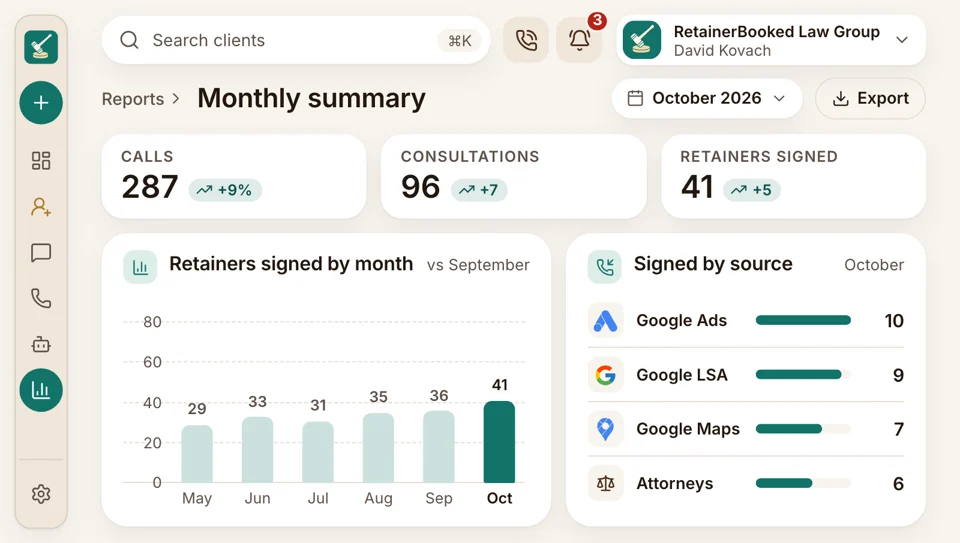
Each month a summary reaches your inbox: calls, consultations, retainers signed and what each signed case cost by source, followed by a call.
- Calls answered and missed, by staff member and hour
- Dashboards built by our team around the questions your partners ask
Staff phone app
Office calls on staff phones
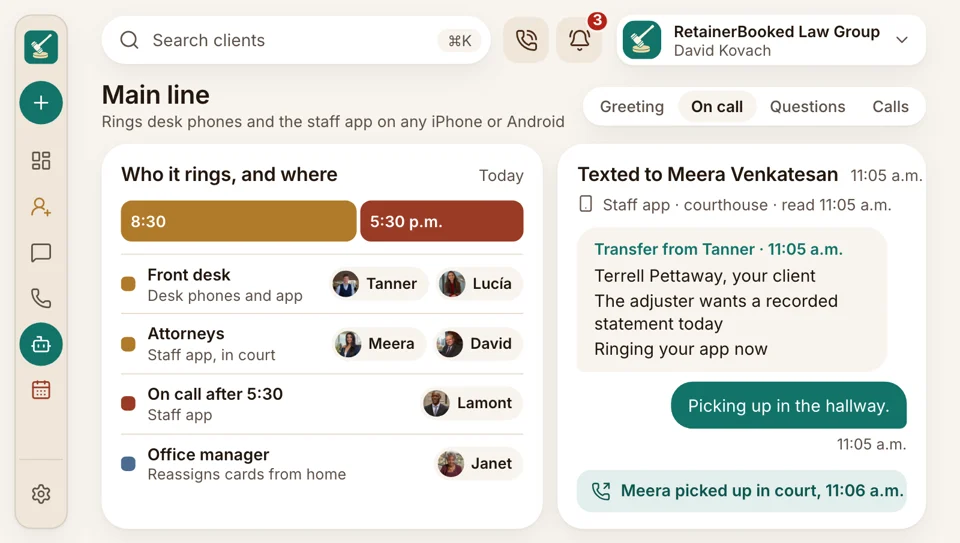
The staff app goes on any iPhone or Android your people carry. From it they answer calls, reply to texts, work the shared inbox, move cards on the pipeline board and check the calendar. The attorney on call can take a transfer in the courthouse hallway, and the office manager can reassign a card from home.
- Incoming calls ring the app and browser at once
- Call-backs show the firm’s main line, so personal cells stay private
One vendor
One invoice instead of five
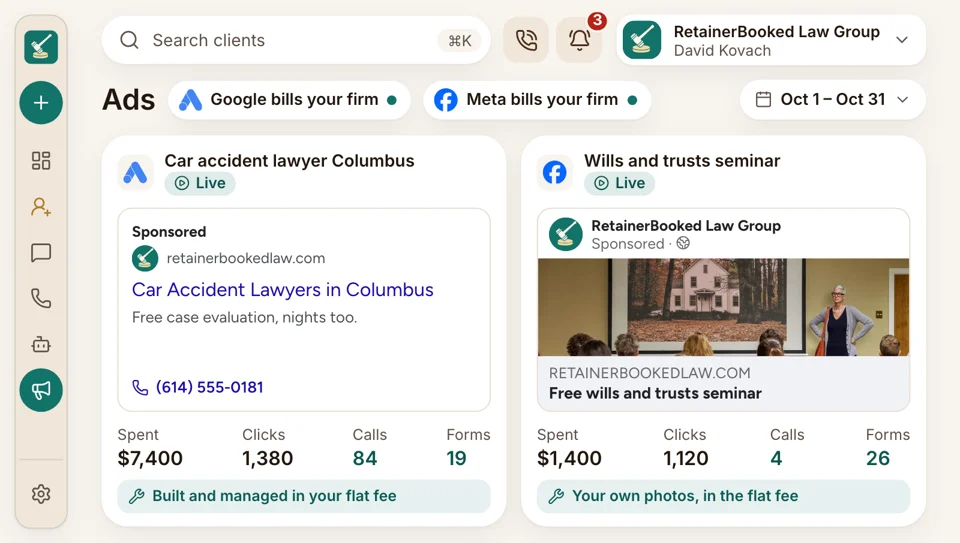
The answering service, the website host, the ad agency, the scheduling tool and the e-sign subscription each send their own invoice. Here a flat monthly fee pays for intake software, your firm’s site and the ads and search work, with one account manager to email. Google and Meta bill your firm for the clicks directly.
- Every Google and Facebook campaign carries your firm’s name, in its own accounts
- Your ad rep and account manager are on the $97 plan too
Monday voicemail
Weekend callers, ready for Monday
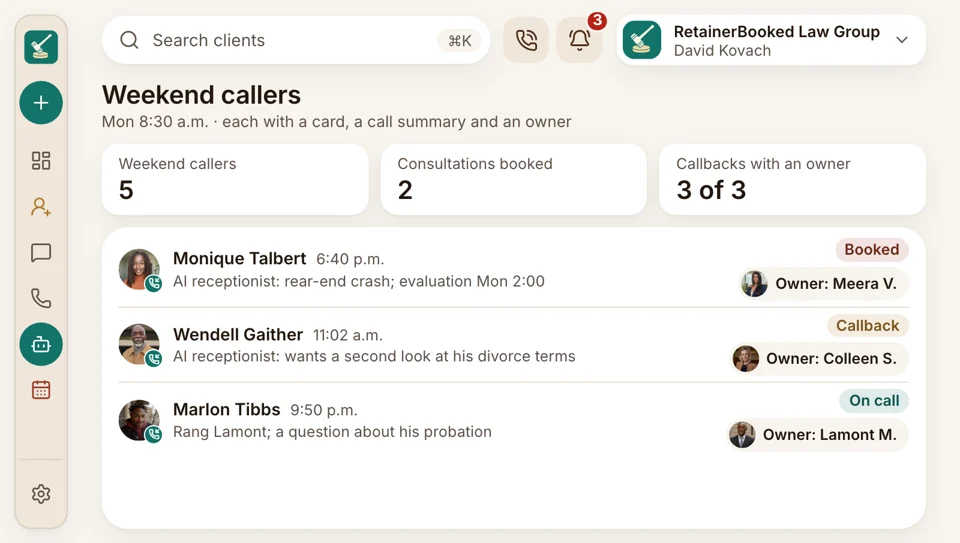
After closing time, calls ring the attorney on call or reach the AI receptionist, which says it’s your firm’s AI assistant, then offers a consultation time or a callback. Monday at 8:30, each caller already has a card, a call summary and an owner.
- Answered calls keep their recording and transcript
- Each unanswered call triggers a text before a minute passes
Shared inbox
Texts, chats and email together
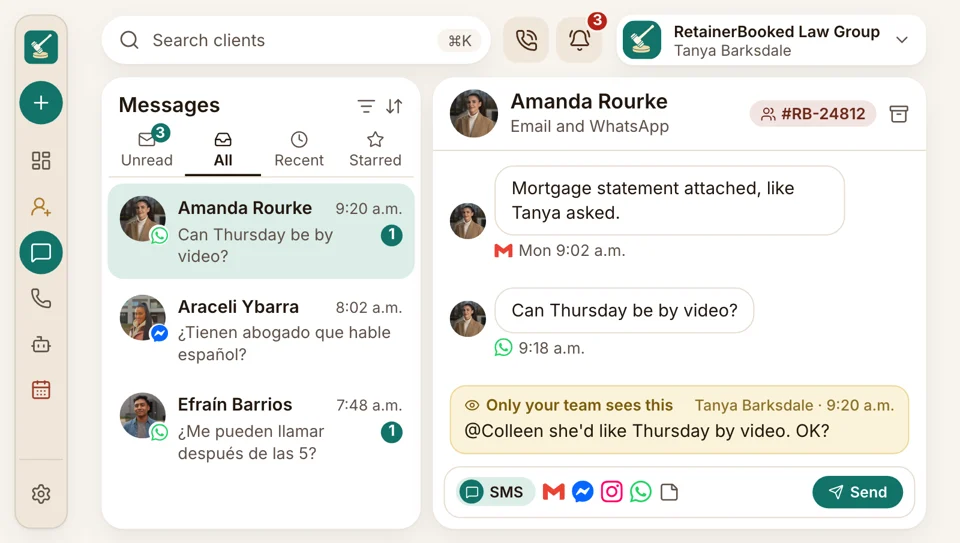
Every channel a person uses, from texts and email to web chat, Messenger and WhatsApp, collects in a single thread for them. Staff leave notes and @mention each other on the thread, and an intake specialist’s role shows only their own cards.
- Each new inquiry alerts the card’s owner by text, email or app
- Saved replies for the questions callers ask most
Google reviews
Reviews
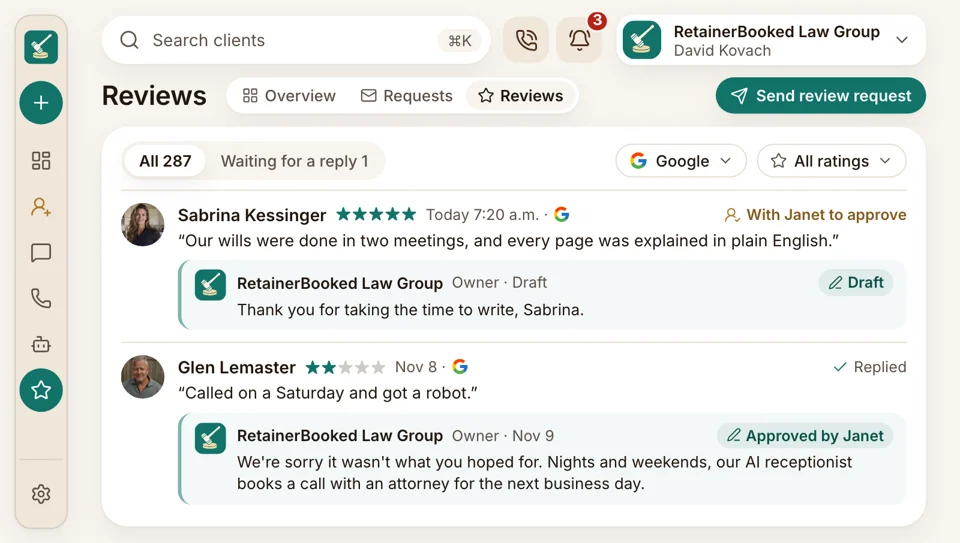
When a case wraps up, the clients you choose get a short Google review request by text. Our team drafts every reply for you to approve, and a reply never confirms that someone was your client or mentions a case.
- New reviews appear on screen the day they post
- Reply drafts wait for your okay before they post


On every plan
- Two-factor sign-in
- Gmail and Outlook mailboxes connected
- Spanish AI receptionist
- An audit log of changes
- QuickBooks Online sync
- Zoom and Google Meet links
What our team runs for the same monthly price
You see one account and one invoice. Behind them, our people build and maintain the phones, website, search, ads, texts, booking page and review requests, and change any of it when you ask.

Office managers Bookings, retainers, fees and reports, fed by each part we run.
Your viewWhat we run
- Phones Your firm’s number kept, with tracking numbers for each ad and source.
- Your website A site our designers build and host, with a booking link and pay button on each page.
- Search pages Practice-area and city pages written for your firm.
- Google and Meta ads Our ad rep builds and runs the campaigns under your firm’s name, judged by what each signed case cost, while Google and Meta bill your firm directly.
- Texts Confirmation and reminder texts from your firm’s number, with consent.
- Booking page Open times from each attorney’s synced calendar.
- Review requests A text to each client once their case closes, with reply drafts.
Bring us the list of tools you pay for
During the demo, we sort each subscription on your desk into what this plan covers and what stays with your case software. Month to month, no setup fee, live in 14 days.


Fewer tabs open

Wesley T.Managing partner, PI firm, Tulsa One invoiceinstead of six vendorsOur office manager used to pay six vendors and chase each one when something broke. Today we get a single invoice and email a single person.

Beatrice V.Founding attorney, Sacramento At bookingevery consultation fee paidConsultation fees are paid at booking now. Nobody at our front desk reads card numbers aloud.

Rashad W.Criminal defense attorney, Atlanta My cellnever shown to callersAfter hours I return calls on the staff app, and callers see the firm’s number instead of my cell.

Harriet B.Office manager, Grand Rapids Zeroinvites built by handEach invite used to mean three Outlook windows open. Now the booking page sends it, with the reminders.

Esteban R.Immigration attorney, El Paso Week oneassistant trained, inquiries importedOur old inquiries came over with their stages and dates intact, and my assistant was trained before the first week ended. I built nothing myself.

Lorena F.Intake manager, Phoenix Every changelogged with a nameRoles keep each specialist on their own cards, and the audit log tells me who changed a stage.


Office questions
Before your office moves over
Try roles, audit log or setup to start.
6 questions
What does RetainerBooked automate for our front office?
RetainerBooked sends the booking confirmations, calendar invites, reminders, retainers, follow-up texts and payment-plan charges your front office now does by hand, and emails the monthly report. Each message goes out from your firm’s number or email, in wording you okayed.
Who builds the automations, us or you?
Our team builds every confirmation, reminder and follow-up during setup, from your firm’s own wording. Email your account manager when one needs changing, and we change it. Your old inquiries come over and your intake team is trained too.
Who can see what?
Each person who logs in gets a role, which decides what they can see. An intake specialist sees only their own cards, a paralegal can text clients without opening reports, and partners see everything. The audit log keeps a name and time on every change, and two-factor sign-in is on for each person. What a potential client tells your intake team stays confidential and encrypted, processed only for your firm and never sold.
What greets the front desk each morning?
The pipeline board: every overnight call, form and chat already sits there, tagged with source and owner, beside today’s consultations from each attorney’s calendar. Staff alerts flag new inquiries, and each card’s tasks show which call-backs are due.
What if a consultation is a no-show?
A consultation marked no-show sends a rebooking text and adds a call-back task for its owner. Texting ends when the caller books again, and every attempt shows on the card.
Does it do document automation?
No. It fills your own retainer agreement in from the intake answers and sends it for an e-signature on the client’s phone; other documents and the matters stay in your case software.
Common searches
Ask about onboarding
Quinn Hadley can walk you through roles, the import and the monthly report.
Quinn HadleyAccount manager
Request a demo