

For intake specialists and managers
Every caller screened and booked,
even over lunchEvery caller booked, even over lunch
RetainerBooked is intake software for the legal intake process at US law firms with 1 to 10 lawyers, with your firm’s website and its marketing in one flat monthly price. Every call, text and form opens a card your team shares.
- Calls, texts, chats and forms each open a card
- Retainers sent from the card

Live in 14 daysQuestions rebuilt and your team trained
- A card from every call and form
- Retainers sent by text
- Questions per practice area
- One shared inbox
- Access by role
Brent calls at 12:40 about a custody hearing and asks for Thursday at 2:00. By hand, that’s six steps across Outlook, a PDF and a spreadsheet, typed between calls and through lunch. Here, it’s one: you pick Thursday at 2:00.
Done between calls, every single booking
You pick the time once
The AI receptionist answers it


Inbox and call-backs
What waits for your team between the calls
Promised call-backs, texts, chats and email, each kept on its caller’s card.


Each caller gets one thread for every text, email and web chat, plus WhatsApp, Instagram and Facebook messages, so whoever opens it next sees the whole conversation.
Promise a call at 4:30 and it becomes a task on the card with that time, and its owner is reminded. At 4:30 the call-back list opens in the dialer, so you work through it one call after another from the browser.
A web form, chat or missed call opens a card, the card’s owner gets a text or an app alert, and the caller already has your firm’s reply.
Through the week
Who has each caller, and what’s next
Three moments in an intake specialist’s week, and what the board shows at each of them.
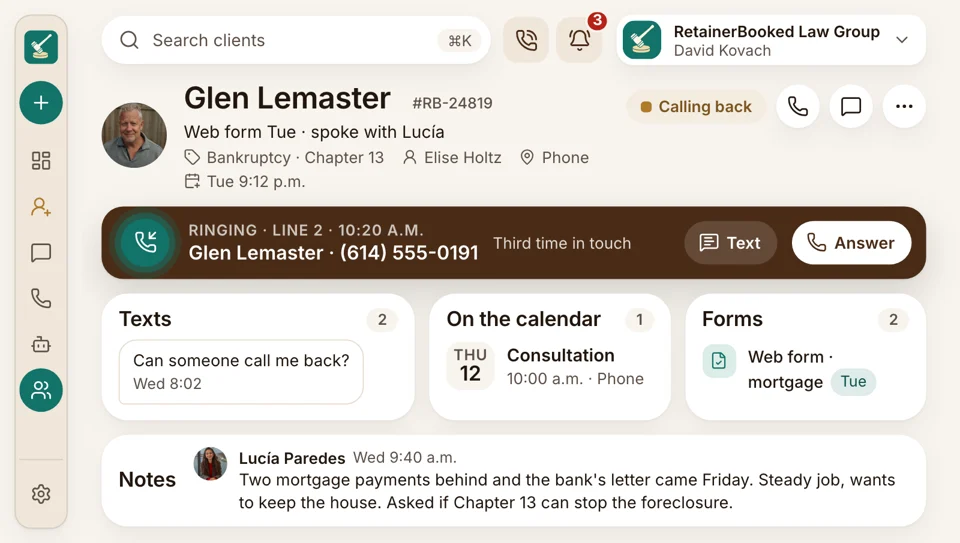
Line two, 10:20
The caller who already spoke to someone
Line two rings. On screen: Glen’s name, Tuesday’s web form, two texts and the call your colleague took. You pick up where it stopped, and nobody asks Glen to start over.
- Recorded and transcribed to the card, announced where your state requires it.
- When the attorney’s free, hand the call over live.
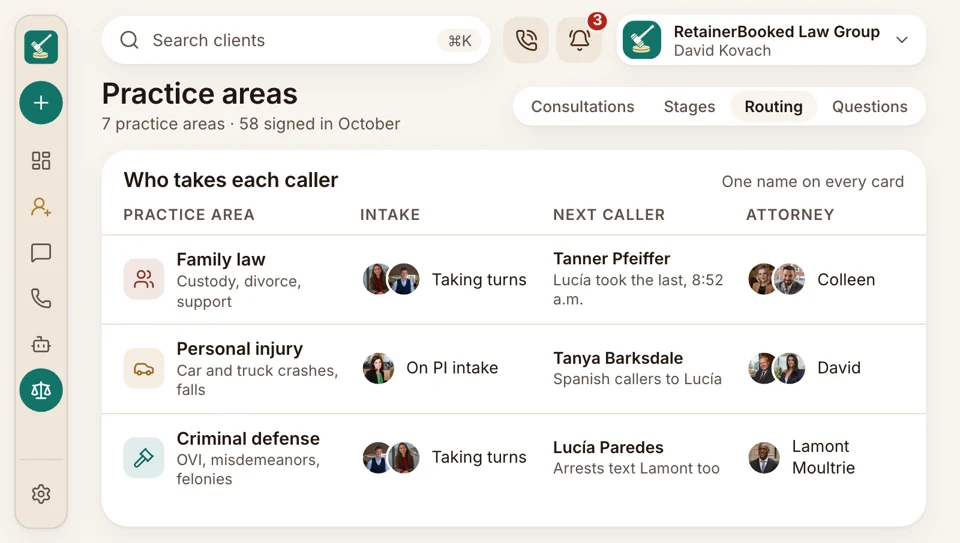
Who takes which caller
Each card with one name on it
A custody call goes to whoever handles family law and a crash call to the person on PI intake, taking turns when two people share a practice area.
- Routed by the practice-area answer or the number they dialed.
- Roles are set for your firm: each specialist sees their own cards.
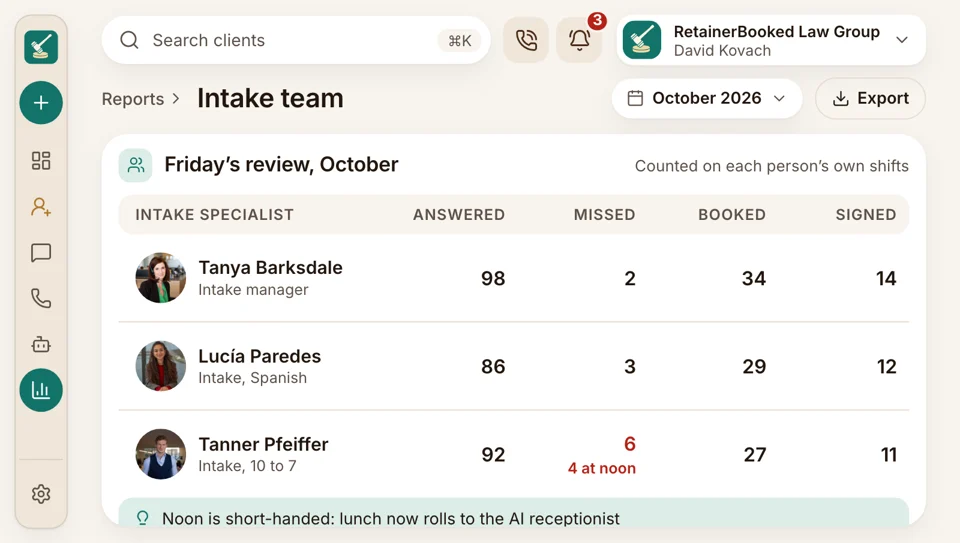
Friday’s review
A team report that’s fair to everyone
Calls answered and missed by person and hour, then consultations booked and retainers signed by each specialist.
- Split by practice area too, so the immigration line isn’t measured against the PI phones.
- Time to first reply on each card, counted from when it opened.


Also included
- iPhone or Android, through the staff app
- Saved replies, one tap
- Spanish calls, chats and texts too
- Notes and @mentions
- Each person’s Gmail or Outlook mailbox connected
- Declined cards kept apart
The retainer goes out from the card itself
The retainer agreement goes out from the card by text, filled in from the intake answers, and is signed on a phone. Then the card moves to Signed, and a connector sends the client on to Clio, MyCase or your case software.

For intake teams The board, the inbox, call-backs, practice-area questions, booking and retainers
You’re hereLinked to intake
- Reports by team member Calls, consultations and signed retainers per person
- Consultation booking Times from each attorney’s calendar
- Messaging Texts from your firm’s number, with replies in the shared inbox
- Google reviews Review requests by text to every client, after the matter closes
- SEO, AI search Practice-area pages that bring in callers
- Ads Google and Facebook ads under your firm’s name, judged by what each signed case costs
- Intake pipeline Every stage, first call through Signed
Your paper forms, rebuilt for you
Hand over the forms and the questions you ask on calls. We rebuild them per practice area, import your old inquiries and train your specialists. Month to month, no setup fee, live in 14 days.


From the intake desk

Wesley T.Managing partner, PI firm, Tulsa Lunch backfor intakeOur two intake specialists ate lunch at their desks. Since the AI receptionist covers noon, both of them actually leave.

Beatrice V.Founding attorney, Sacramento One owneron every new cardMissed calls used to reach me as complaints from the callers. Now each card has one name on it, and I see who called back.

Rashad W.Criminal defense attorney, Atlanta Weekendsanswered, questions already askedSaturday arrest calls used to wait for Monday. Now urgent ones go straight to whoever’s on call, and the card already has the charges.

Harriet B.Office manager, Grand Rapids One stepinstead of six by handBooking a signing meeting used to take me six steps in three programs. Now I pick the time while we’re still talking.

Esteban R.Immigration attorney, El Paso One scriptday or night, English or SpanishMy assistant and the AI receptionist ask the same questions, in English or Spanish, so every card reads the same way.

Lorena F.Intake manager, PI firm, Phoenix Fair countsfor each specialistThe team report counts each person against the hours they covered. Nobody gets marked down for lunch.


Intake FAQs
Asked by intake teams
Type roles, alerts or Clio to see just the answers that mention it.
6 questions
Does it replace the intake team?
No. Your people answer and keep every caller. Overflow and night calls reach the AI receptionist, which introduces itself as your firm’s AI assistant and books or hands over.
Is everything on one card?
Yes. Recordings, texts, emails, chats, form answers and the signed retainer share one card. What a potential client tells your intake team stays confidential and encrypted, processed only for your firm and never sold.
Can we answer from our cell phones?
Yes. Each person installs our staff app on an Android phone or an iPhone, then answers calls, texts and cards from your firm’s number, keeping personal numbers private.
Does everyone see every card?
Only if you choose. Roles are set per firm, so an intake specialist can see just their own cards while the manager sees the whole board.
Do we get alerted to new inquiries?
Yes. The moment a call, form, chat or text opens a card, its owner is alerted by text, email or the app, and the caller has already had a reply from your firm’s number.
How do signed clients reach Clio?
A connector sends them. At Signed, their name, contact details and intake answers are sent on to your case software.
Teams often search
Routing or roles?
Quinn Hadley, your account manager, can walk your intake team through the board, roles and routing before you decide.
Quinn HadleyAccount manager
Request a demo