

Consultation Booking, on every plan
Consultations booked
without phone tag, and they show upBooked without phone tag, and they show up
RetainerBooked is law firm scheduling software for US firms with 1 to 10 lawyers, with your firm’s website and marketing included at one flat price a month. Callers choose the practice area, attorney and slot themselves, even at midnight, and reminder texts follow.
- Booked by practice area, office and attorney
- Paid consultations, credited on signing

Live in 14 daysCalendars, fees and reminders ready
- Booking link sent by text
- Google and Outlook sync
- Consultation fees taken by card
- Text reminders the day before
- Round-robin across your attorneys
- Confidential and encrypted
Amanda writes in about a divorce on Monday. Without online booking, three emails settle on Thursday at 2:00, nobody confirms, and the chair stays empty. With RetainerBooked, Amanda picks the time in one visit, gets two reminders, and confirms by text.
Three emails, one empty chair
Picked online, reminded twice, confirmed by text
A few taps, any hour


Three ways in
Booked wherever the caller starts
Each booking lands on that attorney’s calendar.


Your divorce page carries the booking widget, so a caller reading it at 10:50 p.m. picks family law, the Clintonville office or video, and a half hour with Colleen Sutphen.
Sunday at 8:15 p.m., a caller about an arrest reaches the AI receptionist. It says it is your firm’s AI assistant, asks your criminal defense intake questions and books Tuesday at 9:30 with the attorney next in the rotation. It never says whether there is a case.
Someone who calls but hangs up before choosing a time receives your firm’s booking link by text, and picks Friday at 11:00 over lunch.
Inside Consultation Booking
What comes with every booking
Practice areas and offices
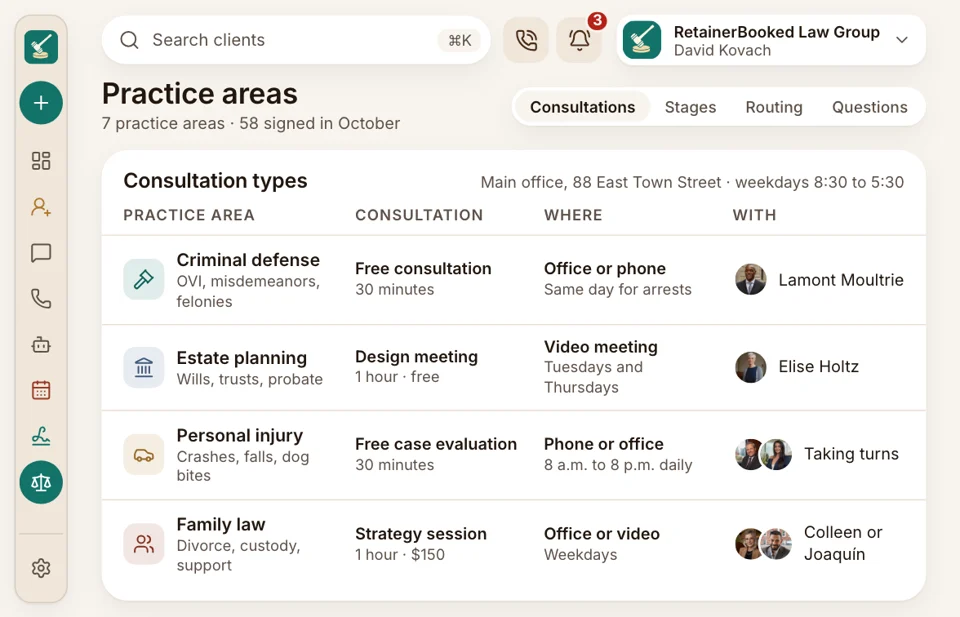
Each practice area, its own calendar
Each practice area gets its own consultation type, length and questions, and each office its own address and hours. A DUI question books a half hour with the defense attorneys in Dublin, while a will books a video meeting with estate planning. Both pages are part of the website we build.
- Each office’s confirmation carries its own address and the parking note you write.
- Each Book button on your site opens the matching calendar for that page.
Paid consultations
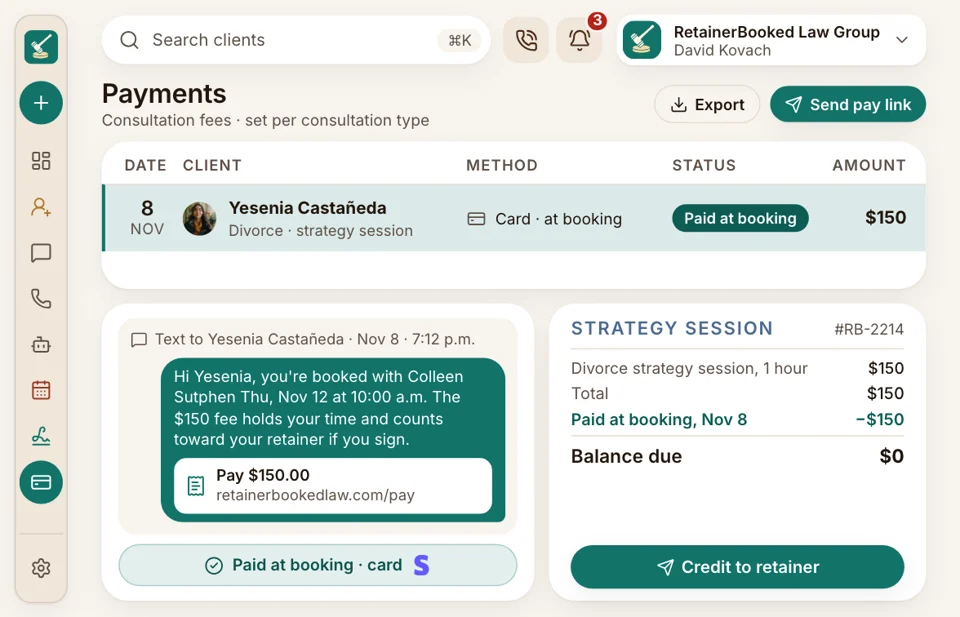
Consultation fees paid at booking
Set a fee for each consultation type, $150 for divorce and none for car accidents, and nobody holds a slot without paying it. If they sign, your firm credits it to the retainer. Money that belongs in trust goes through your own trust processor, such as LawPay or your bank, never through us.
- Your fee policy shows above the card box, in your own words.
- Your firm decides which account each consultation fee goes into, ahead of time.
Reminders and no-shows
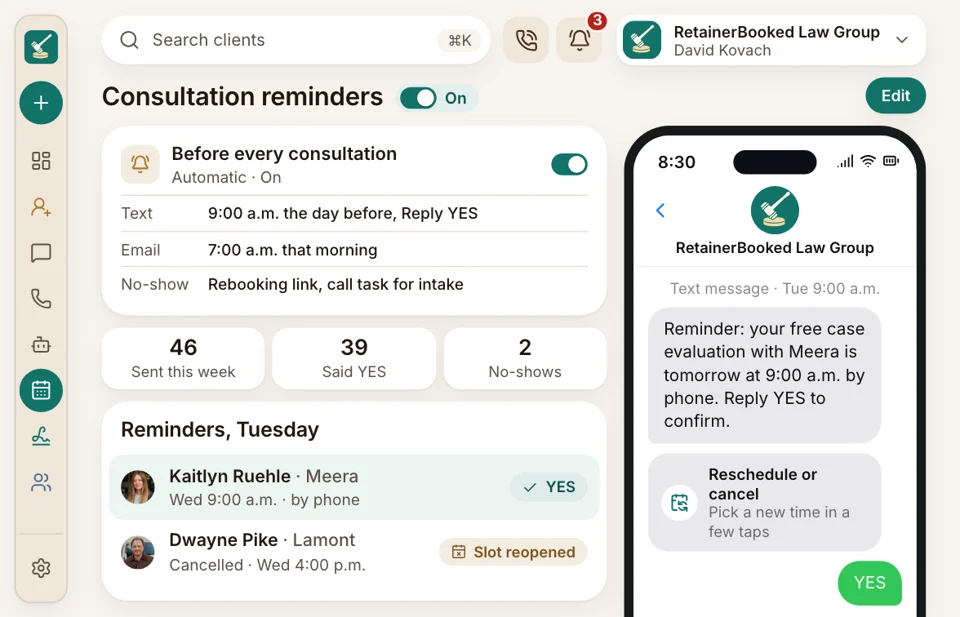
Reminders that ask for a yes
Your firm texts each booked caller a day ahead and emails the same morning, with a reply to confirm, plus reschedule and cancel buttons. A cancelled slot reopens for the next caller. If the chair stays empty, the no-show gets a rebooking link by text and your intake specialist gets a call task.
- Reminder texts come from your firm’s own phone number, every time.
- A no-show is marked once, and the rebooking texts stop when they rebook.
Seminars and signings
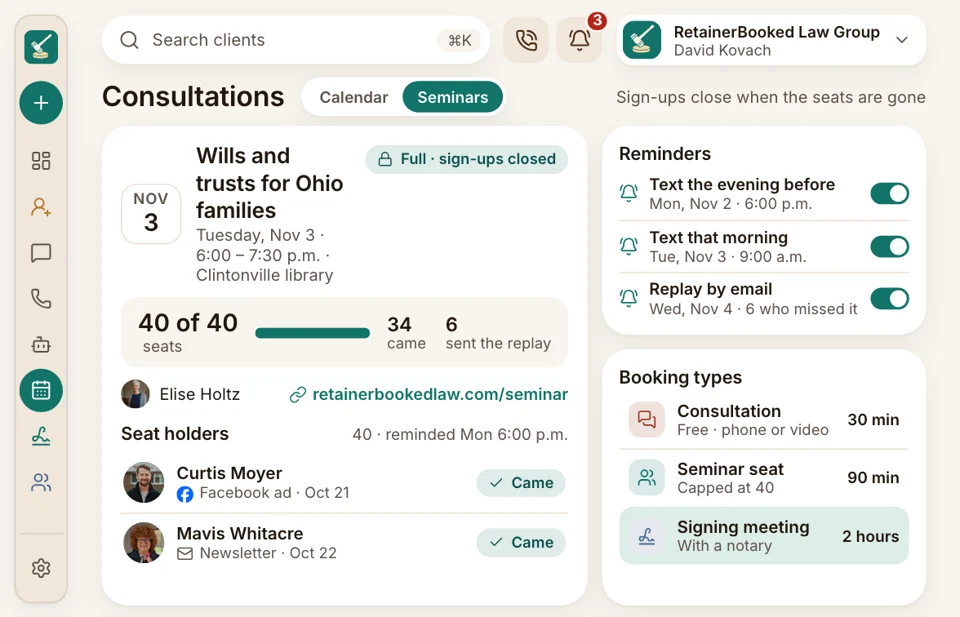
Seminar seats and signing meetings
Your Tuesday trust seminar goes up with 40 seats. Sign-ups close once it fills, each seat holder is reminded the evening before, and those who couldn’t come get the replay link by email. Signing meetings book as their own, longer type.
- Webinars get a Zoom link in every sign-up confirmation.
- Signing meetings sit on the calendar as their own type, with their own length too.


Also included
- Google and Outlook sync
- Round-robin by your own rules
- Zoom or Google Meet links
- Reschedule and cancel links
- Booked by the AI receptionist
- Office, phone or video slots
Amanda’s consultation, on the attorney’s screen
The booking carries the practice area, the Clintonville office, Amanda’s answers to your three questions and the $150 already paid. Colleen Sutphen, Esq. reads it in the courthouse hallway, phone in hand, before walking back.

Consultation Booking Bookings by practice area, office and attorney, with reminders.
You’re hereEvery plan includes
- Consultations booked by source Consultations booked, held and missed, by source and practice area, each month.
- Business phones Your firm’s number on every reminder, with calls tracked to the ad.
- SEO & AI answers We write pages for your city and each area of law you take, so nearby searches reach booking.
- Law firm websites Designed and hosted for you, with booking, chat and a pay button on each page.
- Ads Google and Facebook ads in your firm’s own accounts send callers straight to a booking page, judged by what each signed case costs.
- Two-way texting When a caller answers a reminder, the reply shows in your intake team’s inbox.
- Google reviews When a matter wraps up, every client gets a Google review request.
We set up every calendar
Our team builds a calendar for each attorney, practice area and office, connects Google or Outlook, writes the reminders with you and trains your front desk. Month to month, no setup fee, live in 14 days.


Fewer empty chairs

Wesley T.Managing partner, PI firm, Tulsa 38booked online in OctoberHalf our free case evaluations now get booked after 6 p.m., straight from the site, with nobody on the phone.

Beatrice V.Founding attorney, Sacramento $150paid before every consultationWe charge $150 for a divorce consultation now. People pay when they book, they turn up, and the fee comes off the retainer once they sign.

Rashad W.Criminal defense attorney, Atlanta 9weekend bookingsWeekend arrest calls get a Monday slot from the AI receptionist, so I stop scheduling from the courthouse hallway.

Harriet B.Office manager, Grand Rapids 40 of 40seats filledOur trust seminar books up online now. Sign-ups stop at 40, the reminders go out, and the replay reaches everyone who missed it.

Esteban R.Immigration attorney, El Paso 6 in 10consultations held by videoCallers pick a video consultation, the Zoom link comes by text, and I hold more than half my consultations from my desk.

Lorena F.Intake manager, PI firm, Phoenix 3attorneys, one booking pageRound-robin spreads new consultations across our three attorneys, and nobody argues over the calendar anymore.


Booking questions
Questions about online booking
Type fees, Zoom or seminars to narrow the list.
6 questions
Can people book on a Sunday night?
Yes. Your booking page takes consultations at any hour, whether the caller starts on your website, a text link or the AI receptionist.
Can bookings go by office and attorney?
Yes. Each practice area, office and attorney gets its own calendar and hours, and round-robin shares consultations between attorneys by rules you set.
Does it connect to Google or Outlook, and add Zoom links?
Yes. Each attorney connects Google or Outlook once, and busy times there block booking. Video consultations get a Zoom or Google Meet link. Court dates block times only if they also sit on that Google or Outlook calendar.
Can we charge for the consultation when it’s booked?
Yes. The booking page takes the consultation fee by card, and your firm credits it to the retainer if they sign.
Does it send reminders, and what about no-shows?
Yes. Every booked caller is reminded twice, once by text and once by email, and a no-show receives a rebooking link.
Can the AI receptionist book into the same calendar as our staff?
Yes. It books into your staff’s calendars, with the attorney for that practice area, and says it is your firm’s AI assistant.
Try searching
Ask about your calendars
Quinn can show how your calendars, fees and reminders would be set up for your firm.
Quinn HadleyAccount manager
Request a demo