

E-sign and intake questionnaires for law firms
Intake on their phone,
the retainer signed there tooIntake by phone, retainer signed there too
RetainerBooked gives US law firms with 1 to 10 lawyers their legal client intake form, one per practice area, plus your firm’s website and its ads, at one flat price each month. The answers fill in your own retainer, signed on the client’s phone.
- Questions that change with each practice area
- Documents sent by phone

Live in 14 daysMonth to month, no setup fee
- Form links sent by text
- Reminders until it’s signed
- Uploads from the camera
- Filled in any hour
- A form per practice area
- Confidential and encrypted
Thursday’s family-law consultation ends with a yes. Without e-sign, someone retypes the notes into the retainer, emails it Friday, and the inbox stays quiet until Monday. With RetainerBooked, the filled-in retainer reaches their phone by 2:45.
Waiting in their inbox
Filled in, texted, signed
Your firm’s name on every screen they open


Setup included
Your paper form, rebuilt as a link
What our team builds, and what your clients see.


Our team rebuilds your paper intake set as one questionnaire per practice area. A DUI form asks about the stop and the breath test; a custody form asks about the children. Every answer lands on the card.
Each form asks for what that kind of case needs: the police report and car photos for an injury claim, charging papers for a defense case, pay stubs and bank statements for a divorce. Reminder texts follow until every file is in.
Your retainer template, worded by your firm, fills from the card and goes out by text. The signed PDF returns to the card.
Where cases wait
Between the call and the signed retainer
On your website
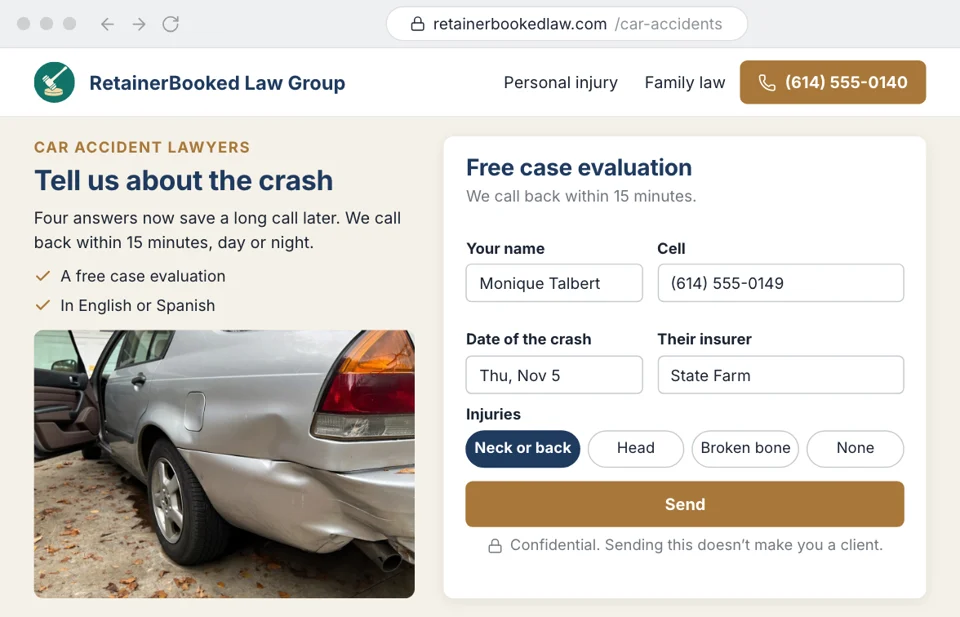
Your car-accident page asks the questions
At 11:20 p.m., someone reading your car-accident page leaves only a name, a cell number and “please call.” Your intake team starts the morning with nothing to go on. We build each practice area’s questionnaire into its page, so their card arrives with the crash date, injuries and insurer answered.
- Car-accident pages ask about the crash date, the injuries and the other driver’s insurer
- Divorce pages skip the custody questions for couples with no children
Conflicts
The conflict found too late
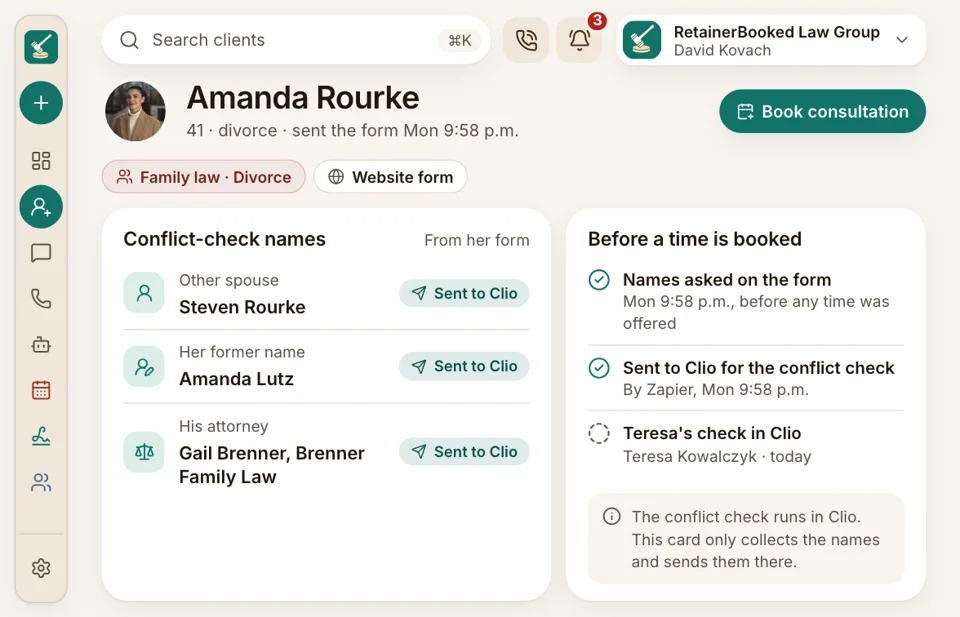
Forty minutes into a divorce consultation, the spouse’s name turns out to match a past client, and the hour is gone. Your form asks your conflict-check questions first: the other party, any former names, their attorney. Those names reach the card before a time is booked, so your check in Clio or MyCase comes first.
- Other parties, former names and opposing counsel, asked before booking
- Your own conflict check runs in your case software ahead of the consultation
Missing documents
The police report nobody sent
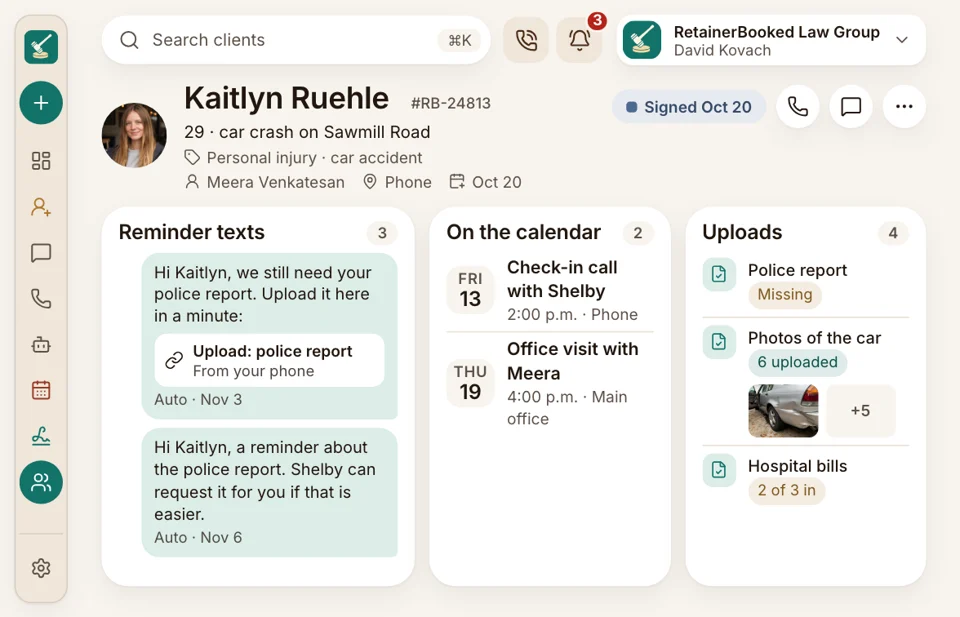
The injury client signed Tuesday. Three weeks on, your paralegal is still emailing for the police report, the hospital bills and the car photos. Your document form gives each one its own upload, and reminder texts go from your firm’s number until each file arrives. Answers to those texts show up in your intake team’s inbox.
- Each document has its own upload button
- Your intake team sees which files are in and which are still out
After signing
No retyping into Clio
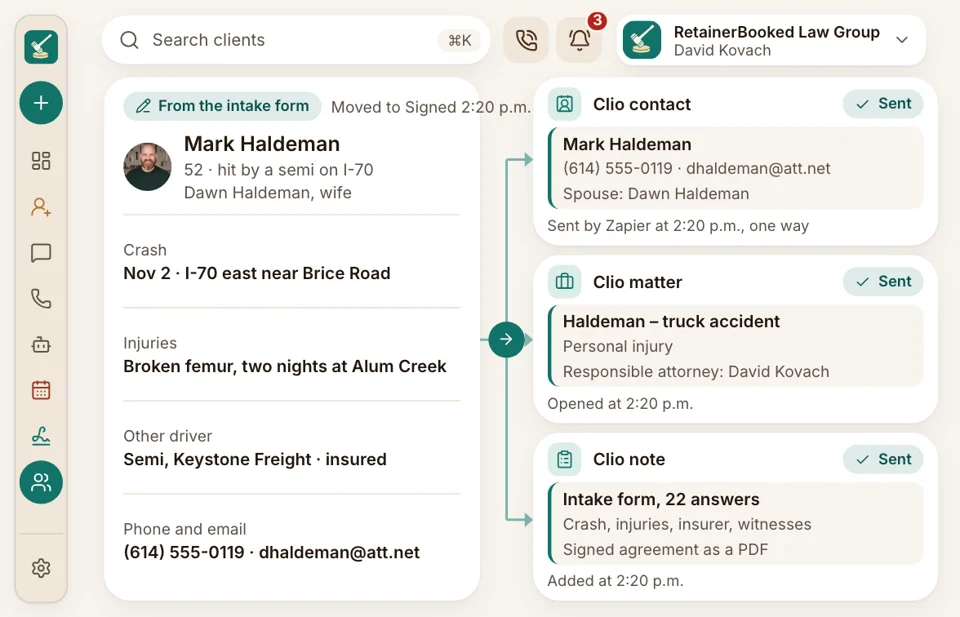
Once the retainer comes back signed, the card moves to Signed. Through a connector, the client’s name, phone, email and form answers go across to Clio, MyCase or the case software you run. The matter, documents, billing and trust accounting stay there, as they do today.
- Your paralegal never types the same address in twice
- Matters, billing and trust stay in your case software


Also included
- Questions that branch by answer
- Paper forms rebuilt
- Upload reminders
- Form links by text
- Conflict-check questions on every form
- Dated PDF of each retainer
Answered once, used all the way through
Kaitlyn filled in your car-accident questionnaire at 10:20 p.m. after clicking your Google ad. Those answers fill the retainer, start the upload reminders and show up in October’s report under that ad.

Retainer signed Thursday The PDF Kaitlyn signed on a phone, kept with the answers behind it.
E-signWhere answers go
- Reporting October’s report counts each signed retainer under the ad, page or referral that sent it.
- Phones The call before the form, recorded on the card.
- SEO & AI search Pages and posts on the cases you take, written for Google and ChatGPT-style answers, each with a form.
- Website Your divorce page carries the divorce form, built in by our team.
- Ads Google and Facebook campaigns, in your firm’s own accounts, open on the matching form, and each signed retainer is reported back to the ad.
- Texts Form links and upload reminders go out from your firm’s own number.
- Reviews Each closed matter can prompt a Google review, sent only to clients you choose.
Your intake packet, rebuilt for the demo
Email one paper intake set and your retainer template to sales@retainerbooked.com ahead of the demo, and you’ll see them as phone forms, the retainer filling in from the answers.


Signed sooner, chased less

Wesley T.Managing partner, PI firm, Tulsa Same dayfor most retainersOur retainers used to wait in email for a week. Now most are signed before the client is out of our parking lot.

Beatrice V.Founding attorney, Sacramento 20 minutessaved per retainerThe custody questions only appear when there are children. The answers drop straight into our retainer, so I never retype a name.

Rashad W.Criminal defense attorney, Atlanta Overnightcharging papers receivedFamilies send the charging papers from their phones the night of the arrest, and I read them before the consultation.

Harriet B.Office manager, Grand Rapids 6 hoursback every weekOur engagement letter fills in from the questionnaire. I used to type every name twice.

Esteban R.Immigration attorney, solo firm, El Paso 2 daysto a complete fileClients send passports and I-94s straight from their phones, and the reminder texts keep going until every page arrives.

Lorena F.Intake manager, PI firm, Phoenix 60% fewercalls chasing photosCrash photos and the police report come in with the form, so my team stopped chasing them.


Common questions
Retainers, uploads and conflicts
Most firms ask first about the retainer, the uploads and Clio.
6 questions
What should our client intake form ask?
It should ask for contact details, the practice area, what happened, the other party’s name and the documents needed. Yours uses your own questions.
Can a potential client complete the form on a phone?
Yes. The form opens from a text or your website on any phone, and photos and documents go straight from the camera or files.
Can the questions change by practice area?
Yes. Each practice area gets its own questionnaire, and later questions appear only when an earlier answer calls for them, so the DUI form asks about a breath test only if there was one. Our team rebuilds your current paper set at setup, at no extra cost.
Can the answers fill in the retainer for e-signature?
Yes. Your own retainer template takes the intake answers, arrives as a text link and is signed with a fingertip. We never write or change your wording.
Does the intake form run a conflict check?
It asks your conflict-check questions, such as the other party’s name and former names; the check itself runs in Clio, MyCase or your case software.
Is what a potential client writes on the form confidential?
Yes. Answers and uploaded files stay confidential and encrypted, processed only for your firm and never sold.
Common searches
Ask about your forms
Quinn reads the paper forms and retainer you send to sales@retainerbooked.com and shows how each would work on a phone.
Quinn HadleyAccount manager
Request a demo