

Reporting for US law firms
What each signed case cost,
source by sourceWhat each case cost, source by source
RetainerBooked's law firm KPI dashboard tells US firms with 1 to 10 lawyers what each signed case cost and which ad, search or referring attorney brought it in. It comes with our intake software, and one flat fee covers your site and ads too.
- Each source's signed cases
- Monthly report and call

Live in 14 daysMonth to month, no setup fee
- Time to first reply
- Every call's source, keyword included
- Spend per signed case, by campaign
- Calls by intake specialist
- Signed cases sent to Google and Meta
The agency's report shows clicks and rankings. The intake spreadsheet shows consultations. Nobody at the table can say what a signed case from Google cost, or whether the attorney who says “I only refer to you” sent anyone this year. Reporting puts each signed case beside its source.
Clicks here, consultations there.
Read off the intake board.
Emailed each month, then a call.


The dashboards
What the partners open each Monday
Three screens, each built from your intake board.


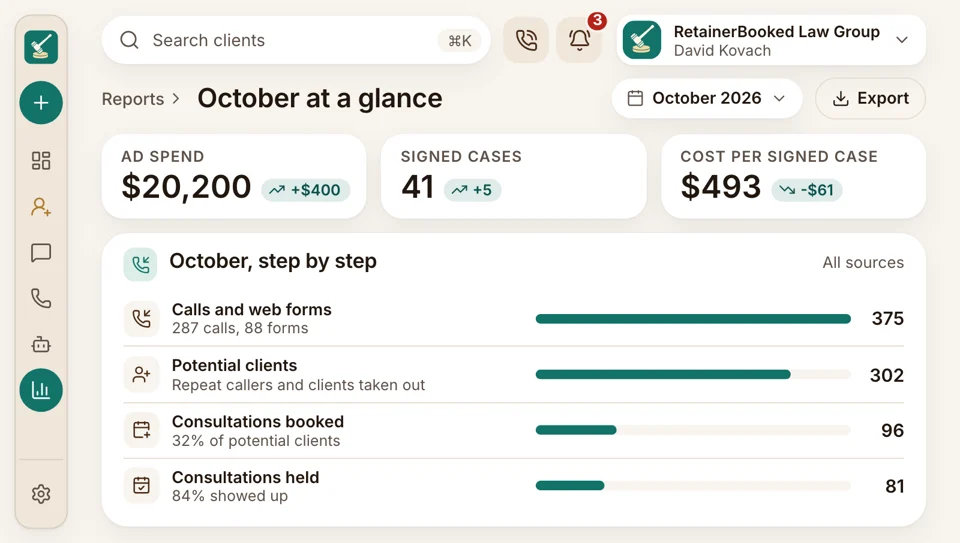
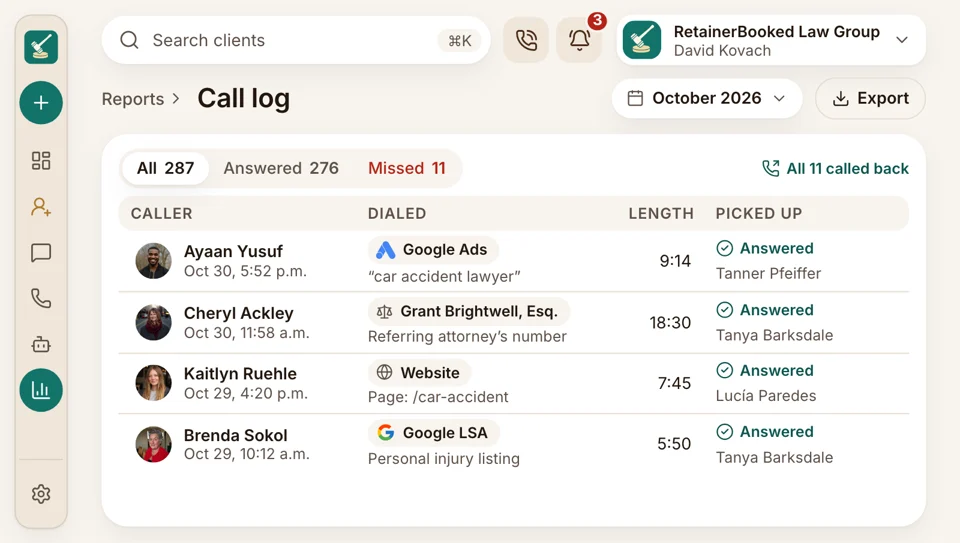
A potential client arrives tagged with what brought them in: the Google ad and keyword, the Local Services Ads listing, the page for a practice area, the referring attorney. The screen counts calls, forms, consultations booked and cases signed for each, month by month.
Each campaign's spend comes straight from your firm's own Google and Meta accounts, divided by the cases your intake team marked Signed. Our team adds Local Services Ads spend once a month.
Intake conversion follows each step: inquiry, consultation booked, consultation held, retainer sent, signed. Split it by source, practice area or the person who owns the card to see where callers stop. A practice area that books well but rarely signs shows it here.
What's counted
What each source sent this month
These are the numbers partners ask about at the meeting. Each is counted off the cards your intake team already works, so nobody keeps a second spreadsheet.
The dashboard
Every stage counted
The dashboard lines up ad spend, calls, web forms, consultations, retainers sent and signed cases for the month, so a partner can read the whole chain in a minute.
- Filter by month, office, practice area or intake owner.
- Check it between hearings, from the courthouse hallway.
Source tracking
Which ad, page or attorney
Your Google ads, your Local Services Ads listing and each referring attorney get different tracking numbers, and your website swaps its number for each visitor so a call carries the search keyword behind it. When the card reaches Signed, the case counts toward that source, and the dashboard adds it to the month.
- Referring attorneys each get a named source, counted all year.
- Web forms and chats keep the page they started on.
Ad spend
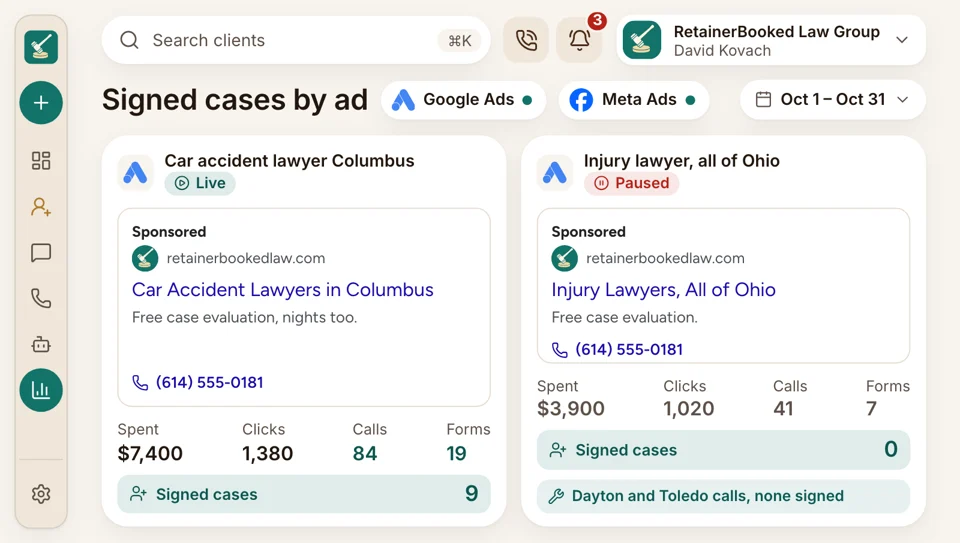
The campaign that signs nobody
Your ads run in your firm's own Google and Meta accounts, and the dashboard pulls in what each campaign spent. Divide that by the cases your intake team marks Signed and you have what each signed case cost, the number our ad rep answers for. Local Services Ads spend is added monthly, and referral sources show counts without a cost.
- Each campaign shows spend, calls, consultations booked and cases signed side by side.
- We shift budget toward ads whose signed cases cost less.
Call reports
Who answered, hour by hour
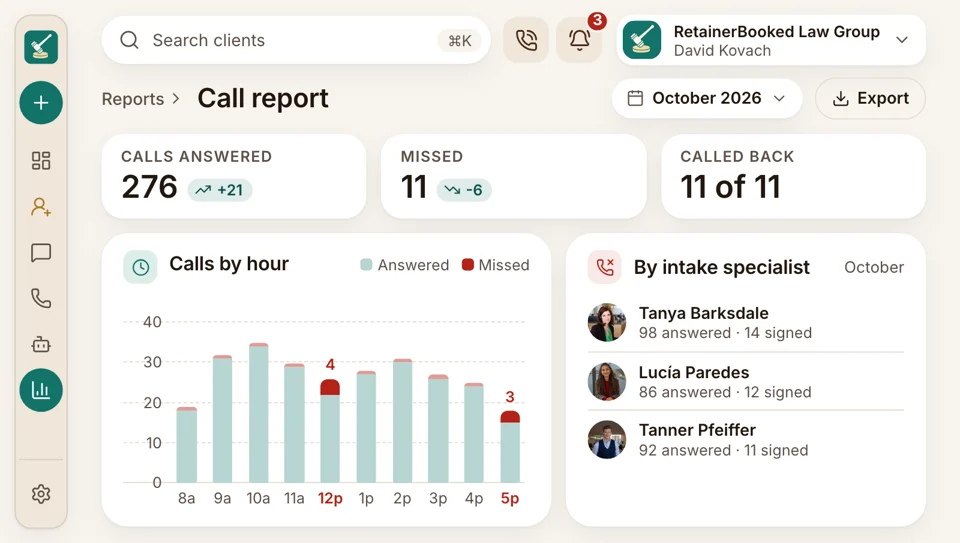
Every call to every tracking number is logged with who answered, how long it lasted and whether it went to voicemail. The call report lays it out by intake specialist and by hour, next to the consultations each person booked and the cases they signed. Recordings and transcripts sit on each card for coaching.
- Unanswered calls by hour point to the shifts that need cover.
- New staff get coached from their own recorded calls.
Speed
Minutes to first reply
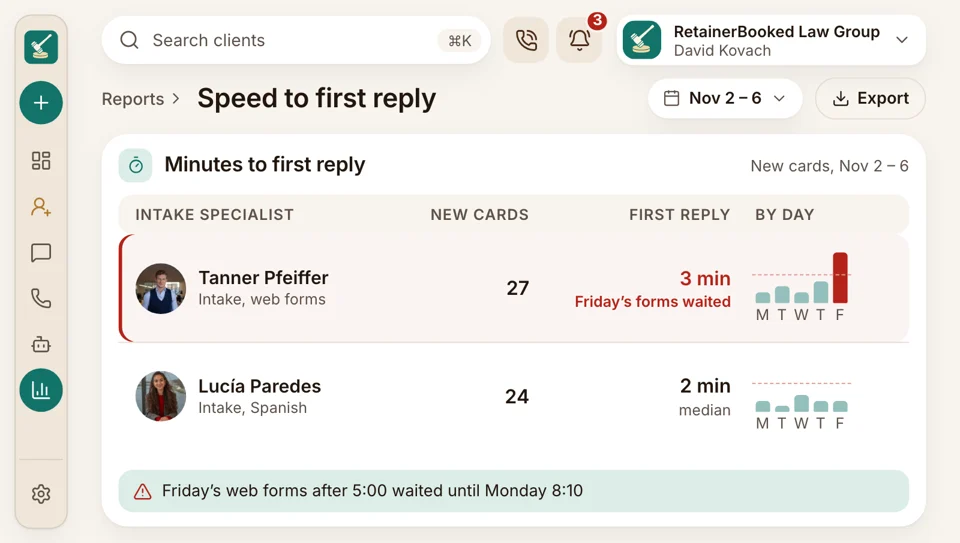
Every new card starts a clock that stops at the first text or call back. Split by source and by person, those minutes show whether Friday's web forms waited until Monday morning. The partners see the same chart.
- Calls, texts and emails all count as a first reply from your team.
- Slow hours show up as tall bars.
Reputation
Reviews
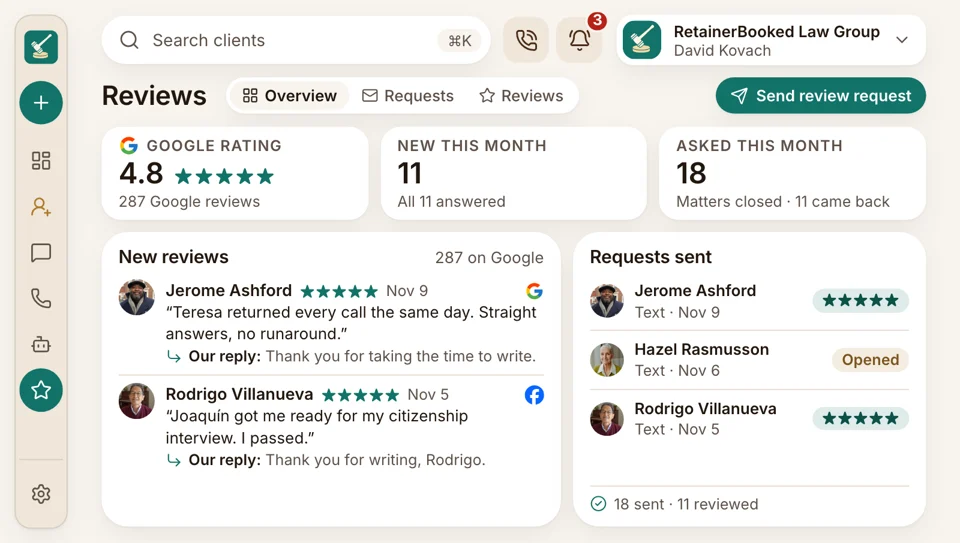
When staff mark a matter done, the client is texted a Google review request, and the dashboard counts requests sent and reviews received. Your Google and Facebook ratings sit beside them month by month, with each reply your team sent.
- Every client asked, never filtered by rating, with nothing offered back.
- Drafted replies keep confidences: no client confirmed, no case mentioned.


Also counted
- Website visits and chats
- Retainers sent, signed and waiting
- Consultation no-shows
- Signed cases by office and practice area
- Forms by page
- Consultation fees paid through your links
Each product feeds the same numbers
Reporting reads from every other part of RetainerBooked. Calls, website visits, ads, texts and bookings each send their numbers in, so nobody exports a spreadsheet at month end.

Reporting The numbers below, lined up by source, with what each signed case cost.
You're hereFeeding the dashboard
- Phones Each tracking number's calls, with recordings and who picked up.
- Website Visits, forms and chats from each practice area and city page.
- SEO & AI Search Calls and forms that started with a Google search.
- Google & Facebook Ads Spend from your firm's own Google and Meta accounts, with each signed case sent back to them as a conversion.
- Messaging Texts and chats, and how long each first reply took.
- Consultation booking Consultations booked, held and missed, by attorney.
- Google reviews How many clients were asked for a review, and how many wrote one.
Your firm's figures, on the demo call
Bring last month's ad spend and a guess at where each signed case came from. During the demo, we sort it by source and show what each case cost. Month to month, no setup fee, live in 14 days.


Numbers the partners trust

Wesley T.Managing partner, PI firm, Tulsa $410per signed caseWe cut a Google campaign that looked busy and signed nothing. The budget moved to Local Services Ads, where cases actually sign.

Beatrice V.Founding attorney, Sacramento Twoattorneys sent most signed casesWhich referral attorneys mattered was a guess for years. The report showed two of them sent most of our signed cases last year.

Rashad W.Criminal defense attorney, Atlanta Saturdayswere ringing out, now answeredOur Saturday mornings were ringing out, and the call report proved it. We put one person on Saturdays and the missed calls stopped.

Harriet B.Office manager, Grand Rapids On the 1streport by emailMonth-end meant pulling numbers from three places into a spreadsheet. Now the report is in my inbox on the first.

Esteban R.Immigration attorney, El Paso Spanishcallers answered as fast as anyoneSpeed of reply was my blind spot. The chart showed Spanish-speaking callers waiting longest, so we fixed that first.

Lorena F.Intake manager, Phoenix Mondaysteam numbers sharedMy team sees its own booking and signing numbers each week. Nobody argues about who did the work.


Reporting questions
Partners ask how the numbers add up
Type referrals, Google or monthly report to start.
6 questions
What does the dashboard show?
The dashboard shows ad spend, calls, forms, consultations, retainers sent and signed cases, split by source and by month. Beside them sit intake conversion, cost per signed case, minutes to first reply and each intake specialist's calls.
Can it show what a signed case cost by source?
Yes, the dashboard shows what a signed case cost for each Google and Meta campaign. Spend comes from your firm's own ad accounts and is divided by the cases your intake team marks Signed. Our team enters the Local Services Ads spend every month.
How are referral sources tracked?
Each referring attorney and other referral source gets a name in your source list, and an attorney who refers often can get a number just for their referrals. Your intake form asks every caller how they heard about the firm, and your intake team chooses which source gets the credit. Once a case is signed, it counts toward that source, so the yearly referral report shows who sent whom. The attorney who says they send you everything shows a real count.
Do signed cases go back to Google and Meta?
Yes, each signed case goes back to Google and Meta as one conversion, so your campaigns learn which clicks became clients. It carries the click, the time and a value your firm sets, never intake answers. Matching by email or phone stays off unless you okay it in writing.
Is there a monthly report?
Yes, every plan gets a monthly report by email and a monthly call, and your account manager runs both. The report covers calls, consultations, signed cases and what each source cost, and the call is where budget changes get decided.
Who builds custom dashboards?
Our team builds custom dashboards at no extra cost. Tell your account manager the question, such as no-shows by consultation type, and we build the screen.
Popular searches
Ask about your numbers
Quinn Hadley can show you a sample monthly report and what each line counts.
Quinn HadleyAccount manager
Request a demo